Draw it
- 4.2
- Rating
- 50.00M
- Installs
- Free
- Price
 Analysis by App-foxy
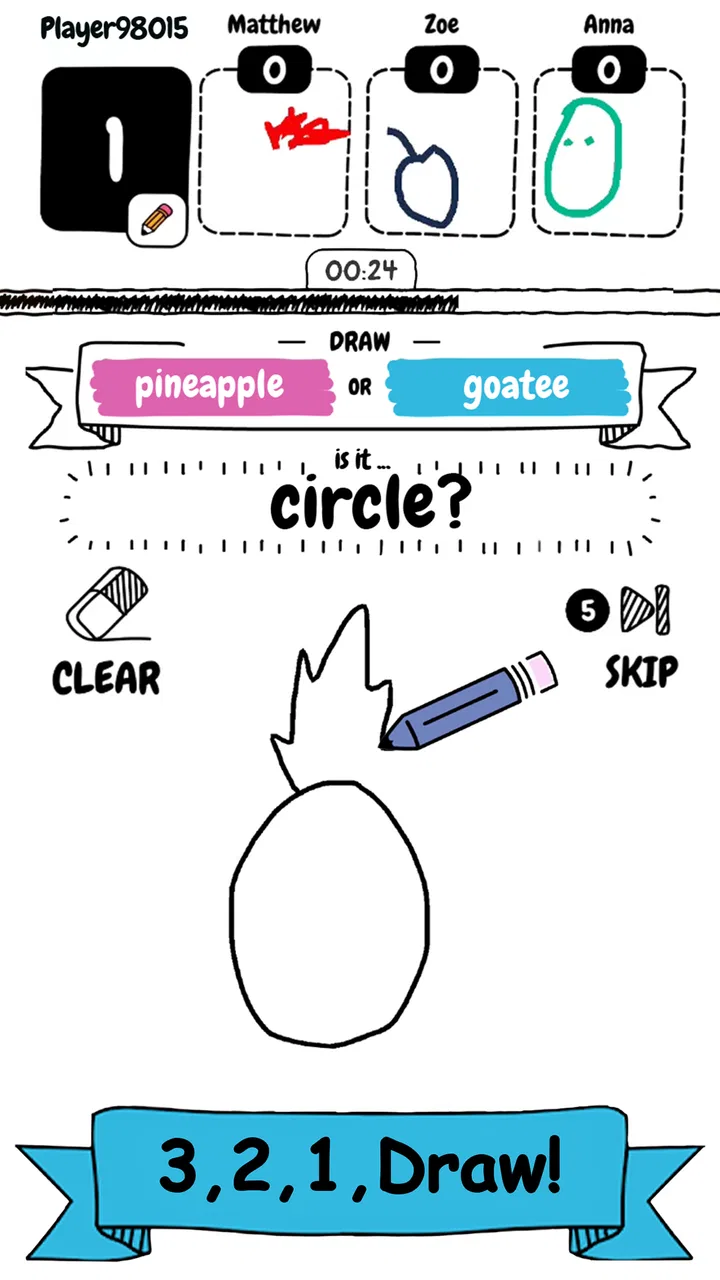
I found Draw it easy to understand within seconds, but surprisingly demanding once the timer starts. It is a free arcade drawing game from Kwalee Ltd where the basic challenge is simple: identify a word and sketch it quickly enough for the game to recognize what you mean. That sounds casual, and it is, yet the short rounds create a pleasant amount of pressure. You are not trying to create beautiful art; you are trying to communicate an idea with a few fast marks.
That distinction is the key to enjoying it. If you approach it like a drawing lesson, the rough results may feel frustrating. If you treat each round as a visual guessing puzzle, the simplicity becomes the appeal. I enjoyed the moments when a crude outline worked immediately, as well as the occasional failure caused by drawing something that made perfect sense to me but was too vague for the game.
It belongs firmly in the arcade game space rather than the more relaxed puzzle category. The rounds are short, the controls are direct, and the main skill is reacting under a countdown. It is suitable for Everyone, which makes it approachable for younger players and for adults who want a quick distraction without learning complicated controls.
You May Also Like

 Blood Strike: 2.5 Anniversary
Blood Strike’s Loadouts Turn Every Drop Into a Tactical Gamble
A close look at Blood Strike’s custom loadouts: how fast access to signature weapons reshapes its battle royale rhythm, rewards preparation, and narrows the gap between fights.

 Pandora - Music & Podcasts
Pandora’s Music Is Easy to Start, but Harder to Recover
Pandora’s strength is its low-effort path from a seed to a station. Its weak spot is how much confidence it asks you to place in connection, setup, and quiet recovery.

 8 Ball Pool
 Is Built on Rivalries, Rematches, and Routine
A close look at the rivalries, rematches, shared routines, and unanswered safety questions that turn a quick pool match into a persistent mobile community.

 Samsung Music
’s Quiet Strength Is Playing What You Already Own
Its reach comes less from spectacle than from dependable access to a personal library. That simplicity is both the app’s strongest retention engine and its ceiling.

 AccuWeather: Weather Radar
AccuWeather Review: A Quick, Clear Forecast for Everyday Decisions
For everyday plans, the best forecast is the one you can understand quickly. AccuWeather makes rain timing, radar, and local conditions easy to act on, with a few trade-offs.

 Hill Climb Racing
Why Hill Climb Racing Still Turns Crashes Into One More Run
A tiny car, a bumpy hill and one more upgrade: Hill Climb Racing keeps resurfacing because its simple chaos makes every near-miss feel personal.
More From Our News Desk
View All News


Getting from installation to your first good round
I’d use the first few rounds to learn how quickly I can turn a word into a simple shape, rather than worrying about winning every guess. A useful starting habit is to notice which marks make an idea recognizable and which ones only take up time. Once that feels natural, the next section looks at how the short-round pace shapes the experience.
What to expect before you begin
The first thing to understand is that this is not a conventional sketchbook. There is no reason to spend time adding detail, shading, or carefully correcting proportions. The winning drawing is usually the one that communicates the most recognizable feature of the target word with the fewest strokes. A simple outline can be more useful than an elaborate picture if the outline is clear and completed before the timer ends.
That makes the game accessible even if you do not consider yourself artistic. I would actually recommend resisting the urge to draw neatly. In a timed round, a quick symbol often performs better than a polished image. For example, when the idea is an object with a distinctive shape, I start with its silhouette, then add one identifying detail. This approach keeps the drawing readable and leaves enough time to react.
The game has attracted a substantial audience, with an average rating of 4.2 from around 825 thousand ratings and more than 50 million installs. Those figures do not guarantee that every player will enjoy the same style, but they do reflect how broadly the quick-drawing format has connected with mobile players. The free entry point also makes it easy to try without committing money first.
There are in-app purchases ranging from $1.49 to $124.99 per item. I would keep that in mind before handing the phone to a child or allowing purchases on a shared device. The game can be approached as a free experience, but the presence of optional purchases means it is worth checking your device’s purchase controls if you want to avoid accidental spending.
The first setup is mostly about your hands
Since the central action is drawing, the practical setup matters more than it may seem. I get a better experience when I hold the phone in a stable position and use the index finger of my writing hand. Drawing with a thumb while gripping the device tightly makes curves less controlled, especially when the target needs a recognizable loop or outline.
Before starting seriously, I suggest making a few test strokes and noticing how much space is available. The useful area can feel smaller once the countdown begins, so it helps to decide where you will place the main shape. I tend to begin near the middle and leave room around it for one or two details. Starting too close to an edge makes the drawing feel cramped and can cause me to waste time trying to fit the rest of the idea.
The current version is 2.1.1, and it supports devices running Android 7.0 or later. That gives the game a broad reach across older Android phones as well as newer models. On a smaller screen, finger placement becomes more important because a single stroke can cover a larger portion of the drawing area. Players with larger phones or tablets may find it easier to add details, but the same rule still applies: extra detail is not automatically helpful.
Your first successful action should be deliberately simple
For a first meaningful success, I would not try to be clever. Look at the word, identify the feature that makes it visually unique, and draw that feature first. If it is something with a familiar outline, make the outline quickly. If it has a distinctive part, such as a handle, wheel, point, or loop, add that next. The goal is to establish recognition before the timer becomes a problem.
One useful habit is to think in layers. The first layer is the broad shape. The second is the clue that separates it from similar objects. The third, if there is still time, is a small finishing mark. This prevents a common beginner mistake: using most of the round on details before the game has any clear idea what the drawing represents.
I also learned not to erase mentally and restart every time a line goes wrong. A slightly uneven drawing can still succeed, while a restart costs the most valuable resource in the round. If the first shape is imperfect but recognizable, build on it. This is one of the places where the arcade design becomes apparent: decisiveness is often more valuable than precision.
Another practical tip is to use visual shorthand rather than literal realism. A few lines that suggest an object may be more effective than attempting to reproduce it exactly. This is especially helpful when the word is familiar but difficult to draw quickly. Ask yourself what someone would need to see to guess the idea, not what the object looks like in a photograph.
Why some drawings work and others do not
The most interesting part of the game is the gap between personal intention and visual clarity. I have drawn pictures that felt obvious in my head but looked like unrelated shapes once placed on the screen. That experience is useful because it teaches you to choose stronger symbols. When a drawing fails, I try to identify whether the problem was the overall outline, the missing distinguishing feature, or simply a lack of time.
There is also a trade-off between speed and ambiguity. A very fast single symbol may finish comfortably but fail to communicate enough. A detailed drawing may be more accurate but arrive too late. The best middle ground is usually a bold primary shape followed by one unmistakable clue. That method is more reliable than filling the screen with many thin lines.
If you are playing while tired or distracted, expect more mistakes. The game asks for quick visual decisions, and hesitation has a direct effect on the result. I find it works best in short sessions: a few rounds during a break, while waiting for an appointment, or when I want something more active than scrolling but less demanding than a full game.
Common confusion for new players
The biggest misunderstanding is assuming that artistic quality determines success. It does not feel that way in practice. A messy drawing can be effective if its structure is clear, while a beautiful drawing can be unhelpful if the recognizable feature appears too late. I stopped judging my sketches by how they looked to me and started judging them by how quickly they expressed the word.
Another source of confusion is the temptation to draw every part of the object. That approach is natural, especially for players who enjoy sketching, but it is not always efficient here. The timer rewards prioritization. If you have to choose between a complete but tiny picture and a large, simplified symbol, I usually favor the symbol because it remains easier to read on a phone screen.
Players may also wonder whether the game is appropriate for a child. Its Everyone age rating and straightforward drawing premise make it accessible, but the purchase range still deserves adult attention on shared devices. I would let a child try it, while making sure the device’s purchase settings match the family’s expectations.
It is also worth separating a failed round from a failed session. Some guesses will miss because your drawing was unclear; others will miss because the prompt is difficult to represent in a few strokes. I would not treat either result as evidence that you are bad at the game. The useful response is to change your opening shape or simplify your idea on the next attempt.
How it compares with other quick mobile games
Compared with a standard match-three puzzle, this game gives you more direct control but less time to think. A match-three title usually rewards planning several moves ahead, while Draw it rewards immediate visual translation. Compared with a digital coloring app, it is much less relaxing because the clock turns drawing into a performance. Compared with a traditional word game, it replaces spelling and vocabulary recall with shape recognition and hand movement.
That makes it a particularly good choice for someone who wants short bursts of interaction without a long tutorial. It also works well for players who enjoy party-style guessing games but want a solo mobile format. On the other hand, people seeking a calm creative tool, a serious drawing practice app, or a strategy game with deep progression should choose something else. The appeal here is the repeated challenge of communicating quickly, not building a permanent artwork or mastering a large system.
The free price lowers the barrier to experimentation, and the broad device support helps older Android users join in. Still, the in-app purchase range may make another option preferable for families looking for a completely purchase-free environment. I would also skip it if timed tasks make you anxious or if you dislike games where success depends on interpreting a rough visual response.
Small techniques that make later rounds easier
My most useful technique is to reserve the center of the screen for the main idea. Peripheral details are easy to overlook, especially when the drawing is made quickly with a finger. A central silhouette gives the game a stronger starting point and helps prevent the picture from becoming a collection of disconnected marks.
A second technique is to draw the feature that changes the category of the object. A round shape alone may suggest many things, but a stem, handle, tail, or pair of legs can narrow the meaning immediately. I think of this as adding an identity marker rather than adding decoration. It is a small distinction, but it makes each stroke earn its place.
A third technique is to avoid repeating a failed strategy without examining it. If a detailed drawing missed, do not simply draw the same detailed picture faster. Try a different representation. Use a side view instead of a front view, a symbol instead of a realistic object, or a single exaggerated feature instead of several accurate ones. The game becomes more satisfying when each mistake teaches you how to communicate better.
For a realistic everyday scenario, imagine having a few minutes before a train arrives. You can open the game, play several rapid rounds, and stop without needing to remember a complicated storyline or save a long sequence of decisions. The same quality works during a short break at home. I would not start it when I need uninterrupted concentration, because the quick rounds encourage “just one more” attempts and can be more absorbing than expected.
Who will enjoy it most
I think the strongest audience is anyone who likes fast challenges, casual drawing, and the satisfaction of improving through repetition. It is especially friendly to players who are comfortable experimenting and laughing at imperfect sketches. You do not need formal drawing ability; you need a willingness to simplify and react.
It can also suit families or friends taking turns with the same phone, because watching someone interpret a word can be entertaining even when the result is unsuccessful. The game’s basic premise is easy to explain, so a new player can understand the objective without a long introduction. That makes it more immediately social than many solo arcade titles, even though the core activity remains personal.
I would be more cautious recommending it to someone who wants a predictable, low-pressure pastime. The countdown can turn an otherwise easy idea into a tense moment, and repeated misses may feel unfair if you expect the game to understand every intention. Players who prefer precise controls may also need time to adjust to finger drawing, particularly on smaller screens.
My next-step recommendation
After the first few successful rounds, I recommend changing your goal from simply finishing to finishing efficiently. Try to complete the main shape earlier, then use the remaining time for one carefully chosen clue. This creates a repeatable workflow and makes improvement easier to notice than chasing a perfect drawing.
It is also worth deciding how you want to manage the free experience before playing for a long session. Since optional purchases range from $1.49 to $124.99 per item, I would review the purchase controls on the device, especially when children use it. That small preparation keeps the focus on the game rather than an unexpected transaction.
As an arcade game, Draw it succeeds because it turns an ordinary action into a compact test of judgment. I like that it does not require me to be artistic, but it does require me to choose what matters. The limitations are equally clear: timed drawing is not for everyone, and the purchase structure may not suit every household. Even so, for a free, quick-play experience from Kwalee Ltd, it offers a distinctive alternative to passive scrolling and more repetitive puzzle formats.
My recommendation is straightforward: try it if you want a few energetic rounds and are happy to draw imperfectly. Start with large shapes, add one identity marker, and keep moving when a line is not perfect. If you want a calm canvas or a deeper strategy system, look elsewhere. If you want the small satisfaction of turning a rushed sketch into a successful guess, Draw it is an entertaining choice that becomes better once you stop trying to draw beautifully and start trying to communicate clearly.
FAQs for Draw it
01What is the main objective of the game Draw it?
Draw it is a fast-paced drawing and guessing game where players compete to sketch assigned words as quickly as possible. The objective is to draw recognizable images so that the AI can guess them accurately. Players are timed, and the more drawings guessed correctly, the higher the score.
02How do the levels and challenges work in Draw it?
In Draw it, players progress through various levels by successfully completing drawing challenges. Each level presents a set of words to draw, with increasing difficulty as you advance. The challenges test your speed and creativity, and completing them unlocks new words and tools.
03Are there any in-app purchases in Draw it?
Yes, Draw it offers in-app purchases that enhance the gaming experience. Players can buy additional word packs, themes, and tools to assist in drawing. While the game is free to download, these purchases can help players progress more quickly and enjoy a wider variety of content.
04Is Draw it suitable for all age groups?
Draw it is designed to be a family-friendly game suitable for all age groups. Its simple interface and intuitive gameplay make it accessible to younger players, while the challenge of drawing under pressure appeals to older audiences as well. However, parental guidance is recommended for very young children due to in-app purchases.
05What are the system requirements for downloading Draw it?
Draw it requires iOS 10.0 or later for iPhone users and Android 5.0 or later for Android devices. It is optimized for both smartphones and tablets, ensuring smooth gameplay across different devices. A stable internet connection is recommended for the best experience, especially for accessing additional features and updates.
Pros
- Intuitive interface for quick sketching.
- Real-time multiplayer enhances competition.
- Wide variety of drawing prompts.
- Encourages creativity and quick thinking.
- Lightweight app with minimal lag.
Cons
- Ads can be frequent and intrusive.
- Limited color options for drawing.
- Some prompts may repeat often.
- Requires internet for multiplayer mode.
- In-app purchases for additional features.

Draw it
Gallery